
WONNIE digital cameras offer compact options for everyday photos, family outings, and children learning to use a camera of their own. The range includes beginner-oriented point-and-shoot models with built-in screens for composing and reviewing pictures. Depending on the model, features include video recording, creative filters, face detection, time-lapse, and rechargeable batteries. Kids cameras give younger photographers room to experiment without borrowing a parent’s phone, while other models may suit casual photography or video projects.
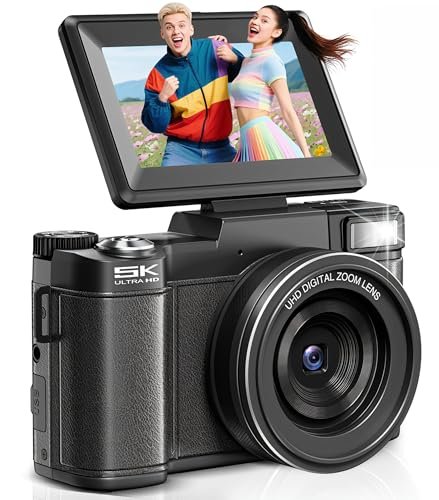
WONNIE CD-R2-250512 5K Digital Camera with 3-Inch Flip Screen
Description
The WONNIE CD-R2-250512 is a compact digital camera for everyday photography, travel, and vlogging. It offers advertised 64MP photo output and 5K video recording, along with autofocus and 18× digital zoom. The listing does not specify native sensor resolution or the pixel dimensions and frame rate of its 5K recording mode.
A 3-inch IPS screen flips 180 degrees to face the user for framing selfies and videos. USB webcam mode allows the camera to serve as a webcam for video calls or streaming. A recording pause function lets users pause and resume capture during a session.
Creative options include slow-motion and time-lapse modes, vintage filters, face detection, and adjustable ISO and exposure settings. A built-in flash provides additional light, while anti-shake and noise-reduction functions are also listed. The source does not identify the stabilization method or autofocus system.
The package includes a pre-installed 64GB SD card and two rechargeable batteries, providing storage and a spare battery for outings. Battery capacity, charging time, and shooting runtime are not specified. The 18× zoom is digital; optical zoom is not stated.
Features
- 180-degree flip screen allows self-facing framing for selfies and vlogging
- Autofocus provides automatic focusing for photo and video capture
- 18× digital zoom adjusts framing for more distant subjects
- USB webcam mode supports video calls and live streaming
- Recording pause function allows capture to pause and resume during a session
- Slow-motion, time-lapse, and vintage filters provide creative recording options
- Face detection, adjustable ISO, exposure controls, and built-in flash offer shooting flexibility
- Included 64GB SD card and two rechargeable batteries provide storage and backup power





Specifications
- Brand
- WONNIE
- Model
- CD-R2-250512
- Part Number
- CD-R2-250512-001
- Product Type
- Compact Digital Camera
- Color
- Black
- Size
- Compact
- Advertised Photo Resolution
- 64MP
- Advertised Video Resolution
- 5K UHD
- Focus Type
- Autofocus
- Digital Zoom
- 18×
- Screen Size
- 3 inches
- Screen Type
- IPS
- Screen Flip
- 180 degrees
- Webcam Connection
- USB
- Power Source
- Rechargeable battery
- Included Batteries
- 2
- Included Memory Card
- 64GB SD card, pre-installed
- Recording Features
- Pause function, slow motion, time-lapse
- Photo Features
- Vintage filters, face detection
- Adjustable Settings
- ISO, exposure
- Flash
- Built-in
- Listed Image Processing
- Anti-shake, noise reduction
- Included Components
- Camera, 64GB SD card, 2 rechargeable batteries
How to Choose a WONNIE Camera
Start with the intended user: consider grip size, weight, button layout, and menu simplicity for a child, or focus control and screen adjustment for someone recording video. Compare sample images and video where available rather than choosing by megapixel count alone. Check whether zoom is optical or digital—digital zoom crops or enlarges the image and can reduce detail. Confirm autofocus, stabilisation features, video resolution, audio recording, and battery options for the exact model. Review the included memory card, supported storage capacity, charging equipment, and spare batteries. A camera described as suitable for children is not necessarily waterproof or resistant to drops.
Setup, Use & Care
Charge the battery as instructed, insert a compatible memory card, and take a few test pictures before an outing. Back up files before formatting a card, since formatting deletes its contents. Show children how to hold the camera steadily, keep fingers away from the lens, and review their shots; simple photo challenges can help them practise. Keep batteries and memory cards away from toddlers, and have an adult supervise charging and battery changes. Protect the camera from water, sand, excessive heat, and impacts unless the manual explicitly permits those conditions. Use a suitable soft cloth for cleaning and transfer photos regularly to a separate backup. For faults or replacement accessories, use the service contact details in the instruction manual included with your purchase.